Local AI that explains what your sensor is telling you.
Turn raw error codes, zone names, and device state into plain-language guidance, without
sending a single byte off the machine. The AI is optional, off by default, and runs entirely
on 127.0.0.1.
The managed backend runs a local llama-server bound to 127.0.0.1.
The diagnostic context, your error codes, zone names, and device state, is sent to that
loopback address and nowhere else. No account, no cloud, no telemetry. Once the model is
downloaded it works fully offline, which matters on an air-gapped commissioning bench.
02 · explain
Rules are the truth. The model just explains them.
The numbers and safety state come from the sensor and the protocol decoder, not the model.
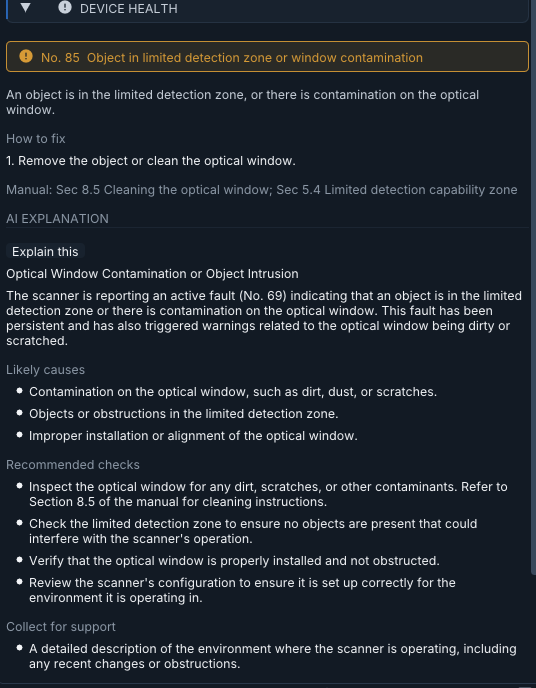
When something looks wrong, an "Explain this" action on the device-health card asks the
local model to translate the current state into a readable explanation and next steps. The
model never decides whether a zone is intruded or an output is tripped; it only puts words
around what the rules already determined.
The device-health card is authoritative (error number, manual references); the local AI
adds the plain-language explanation beside it.03 · backends
Bring your own server, or let the app manage one.
llama-server (managed) is the private default: the app downloads, launches,
and supervises a local server for you, and the data stays on the loopback interface. Ollama (external server) points at an Ollama host you already run; useful if
you have a shared GPU box, with the tradeoff that the diagnostic context travels to that host
over your network. Pick per workstation in Settings.
04 · download
One download, then you own it.
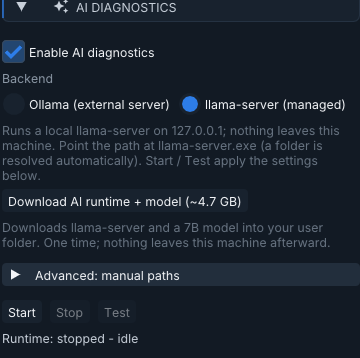
From Settings, "Download AI runtime + model" pulls the llama.cpp runtime and a
Qwen2.5-7B-Instruct model (about 4.7 GB total) into your user folder, one time. We host only
a small manifest; the runtime comes from llama.cpp's GitHub releases and the model from
Hugging Face. Every file is verified against a published SHA-256 before it is installed, so a
tampered or changed-upstream download aborts rather than landing.
Settings > AI diagnostics: one-time download, or point at your own paths or Ollama host.05 · requirements
Honest about the edges.
The managed runtime targets Windows x64 today and runs on CPU, so the first answer on a large
model is not instant. The feature is opt-in: it ships off, downloads nothing until you ask,
and can be disabled at any time. If you prefer your own stack, the Ollama backend lets you
choose the model and the hardware.
Ready to try it?
Install the app, then enable AI diagnostics from Settings when you want it.
This site uses strictly necessary cookies for admin login and counts visits as
aggregate totals only. We will ask before loading any privacy-friendly analytics. See the cookie notice for details.